
How to Target the Correct Country in Search Console

Google’s mission is simple: to deliver the most relevant content to users based on their intent, behavior, and location. That last part—location—plays a massive role in search visibility. If your website isn’t optimized for the right geographic audience, your content could be shown to the wrong users, lowering your rankings and conversions.
Whether you run a local service in Chicago or ship nationwide through your e-commerce store, correctly configuring your country targeting is key to showing up in the right searches.
In this updated guide, you’ll learn:
- Why international targeting matters more than ever
- How Google identifies your geographic focus
- When to use Search Console targeting vs. hreflang tags
- How to avoid common mistakes that hurt your SEO
- Real-world examples to make implementation easier
Why International Targeting Matters: Relevance = Rankings
Here’s a scenario: You search for “chips.”
- In the U.S., Google shows you Lay’s or Doritos.
- In the U.K., you get “crisps,” and “chips” refer to French fries.
This is the essence of international targeting—relevance depends on region.

If your site doesn’t send strong location signals, Google may serve it to the wrong audience. That means:
- Lower rankings in your intended country
- Increased bounce rates from confused users
- Missed opportunities to engage with qualified traffic
Scenarios Where Geo-Targeting Is Critical
✅ Local Businesses
A dentist in Salt Lake City won’t rank for “dentist near me” in Phoenix. Setting a geographic target helps you dominate local SERPs.
✅ Global Brands with Regional Sites
Let’s say an Australian brand uses a .com domain. Without proper country settings, U.S. traffic may accidentally get routed to their Australian pricing and shipping policies.
✅ Cross-Border Services
A ski resort in Canada trying to attract American tourists must clearly signal that the content is U.S.-facing (USD, English, U.S. testimonials).
How Google Determines Your Website’s Geographic Focus
Google uses a mix of signals to determine what country your website targets. Here’s what matters most in 2024:
1. Country Code Top-Level Domains (ccTLDs)
Using a ccTLD like .us, .ca, or .de is a strong indicator of country intent.
Example: A site with .co.uk is assumed to serve U.K. users.
2. Server Location (Less influential now)
While previously important, Google’s John Mueller confirmed server location is no longer a key signal. Your U.S.-hosted site can still effectively target Germany—if you configure it right.
3. On-Page Content Signals
- Local phone numbers and addresses
- Currency (e.g., USD vs. EUR)
- Local spelling and language (e.g., “color” vs. “colour”)
- Backlinks from regional domains like .gov or .edu
4. Google Search Console Settings
Manually setting a target country in Search Console is the strongest override signal—especially for generic domains like .com or .org.
How to Use the International Targeting Tool in Google Search Console
Follow these steps to set a geographic target in Google Search Console:
- Go to your Search Console property
- Click on Settings > International Targeting
- Under the “Country” tab, check the box to set a target
- Select your desired country (e.g., United States)
🔔 Tip: Don’t set a target if your site serves multiple countries, or you may unintentionally limit visibility.
What If My Website Targets Multiple Countries?
If your business caters to different regions, simply setting one country won’t cut it. Instead, you’ll need to create localized versions of your content and use hreflang tags.
What Are Hreflang Tags?
Hreflang tags are HTML attributes that tell search engines which language and regional version of a page to display to users in a specific country or language setting.
Think of hreflang as Google’s GPS for your content.
It ensures users from France don’t accidentally land on your English site, or that Spanish-speaking users in Mexico get the right version of your sales page.
Example:
html
<link rel=”alternate” hreflang=”en-us” href=”https://example.com/us/” />
<link rel=”alternate” hreflang=”en-gb” href=”https://example.com/uk/” />
<link rel=”alternate” hreflang=”es-mx” href=”https://example.com/mx/” />
When Should You Use Hreflang?
Use hreflang tags if:
✅ You have translated content for different languages (e.g., English and Spanish)
✅ You serve the same language but different regions (e.g., U.S. vs. U.K.)
✅ You want to avoid duplicate content issues when your regional pages are very similar
Avoid hreflang if:
⛔ You only have one version of your site
⛔ You’re not offering unique content per region/language
How to Implement Hreflang Tags
There are three main methods to implement hreflang:
- In the HTML head section (ideal for most SMBs):
html
CopyEdit
<link rel=”alternate” hreflang=”fr-fr” href=”https://example.com/fr/” />
2. In the HTTP header (used for non-HTML files like PDFs)
3. In your XML sitemap (useful for large websites or enterprise-level structures)
⚠️ Note: Hreflang tags must be reciprocal. If page A links to page B, then page B must link back to page A.
Should I Use Hreflang or Set a Target Country?
Here’s a quick guide:
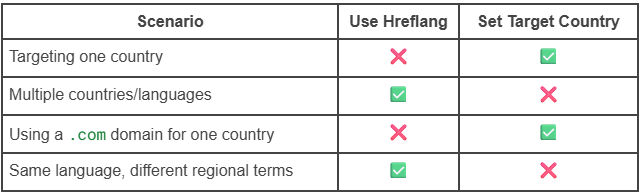
You can also combine both, but make sure you avoid conflicting signals.
Does Setting a Target Country Impact Global Traffic?
Yes—and here’s how:
- Setting a country helps Google rank you better in that country, but may reduce visibility in other regions.
- If you’re focused solely on the U.S. market, it’s beneficial to set the U.S. as your target.
- If your site attracts a global audience, setting a country can unintentionally limit your reach.
A safe approach for global brands:
- Avoid setting a target country
- Use hreflang to manage localization and language
- Customize each version’s content with local currency, tone, offers, and examples
Final Thoughts: Align Your SEO With the Right Geography
International targeting is not just a technical box to check—it’s a strategy. Done right, it gives your business visibility where it matters most, delivers better user experiences, and helps you rank higher with fewer headaches.
Whether you’re a U.S.-focused company or reaching across borders, it’s time to get intentional about how you speak to your audience—by geography and by language.
🚀 Need Help Targeting the Right Market?
Boostability’s team of SEO experts specializes in helping businesses optimize for geographic relevance. From hreflang implementation to Search Console configuration and content localization, we’ve got the tools and expertise to help you grow where it matters.
Do not let the complexities of SEO or the dynamic digital environment impede your growth. Partner with Boostability to navigate the path to enhanced online visibility.
Ready to elevate your online presence and increase customer acquisition?
➡️ Request Your Complimentary SEO Consultation Today!
➡️ Review Our Affordable SEO Service Packages
➡️ Examine Our Small Business SEO Success Stories
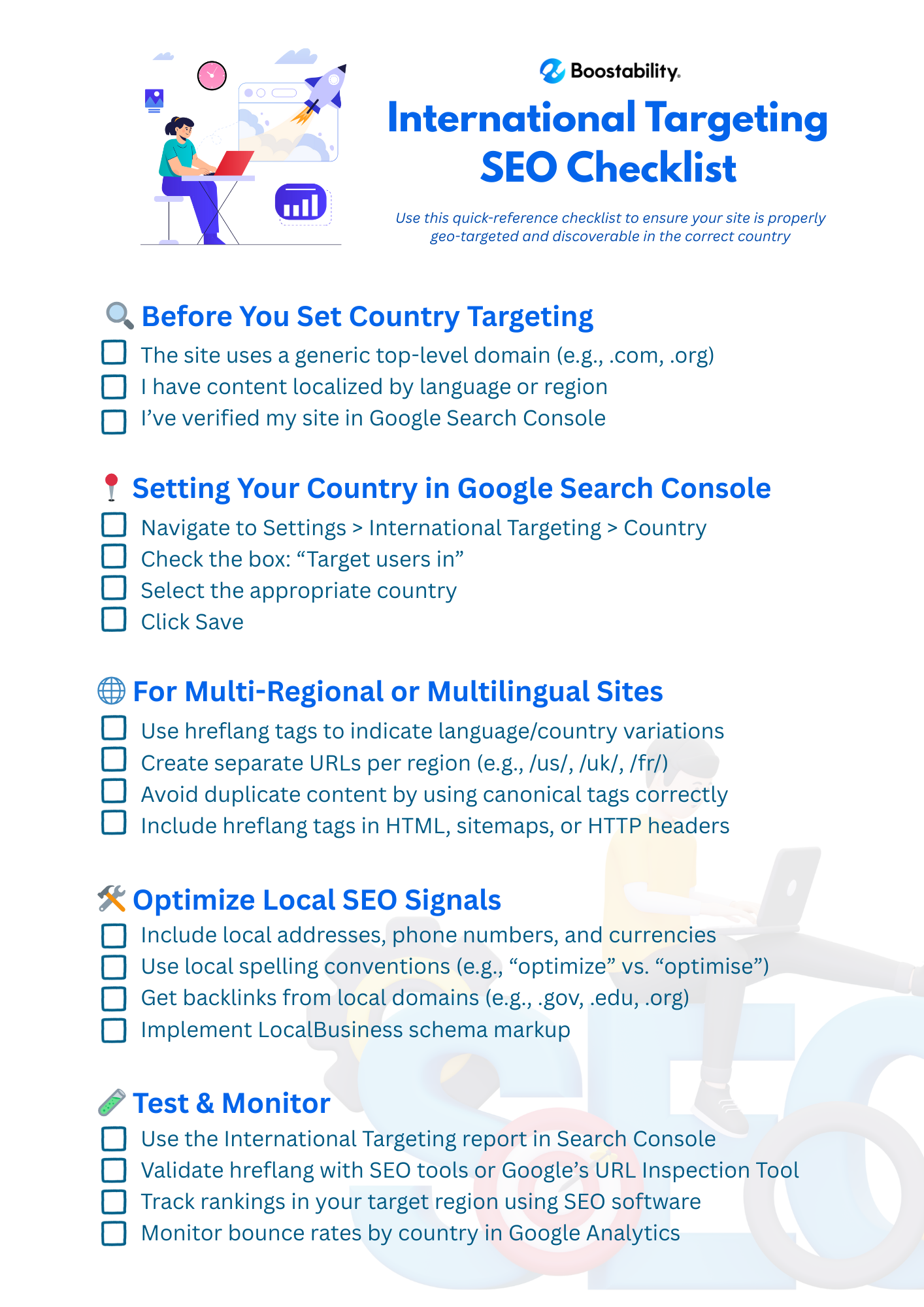
International Targeting SEO Checklist
This article was first published on May 2nd, 2016, and was last updated in May 15, 2025
