# How Do iFrames impact Your SEO?

- Link: https://www.boostability.com/digital-marketing/the-affect-of-iframes-on-seo/
- Published: 2025-05-01T00:00:11-07:00
- Author: Colton Miller

Remember <iframe> tags? These snippets of HTML code allow you to embed content from
one webpage directly into another. Think embedding a YouTube video, a Google Map,
or a social media feed onto your site. For years, the SEO community debated whether
using iframes was a death sentence for your search rankings. Old advice often warned
against them, fearing search engines couldn’t “see” or properly credit the content
within.

Recently, things are a bit more nuanced. While search engines like Google have gotten
significantly better at understanding and indexing iframe content, using them still
comes with potential SEO implications and trade-offs.

This post will give you the up-to-date, comprehensive lowdown on:

 * What iframes _really_ are.
 * How search engines (especially Google) currently crawl and index iframe content.
 * The potential SEO benefits and drawbacks of using iframes today.
 * Best practices for using iframes safely (if you must).
 * Modern alternatives that might be better for your SEO and user experience.

Let’s dive in and separate the myths from the modern reality of iframes and SEO.

### **What exactly is an iFrame?**

An <iframe> (Inline Frame) is an HTML element that essentially loads a separate 
HTML document within the current one. It acts like a mini-browser window embedded
directly onto your page.

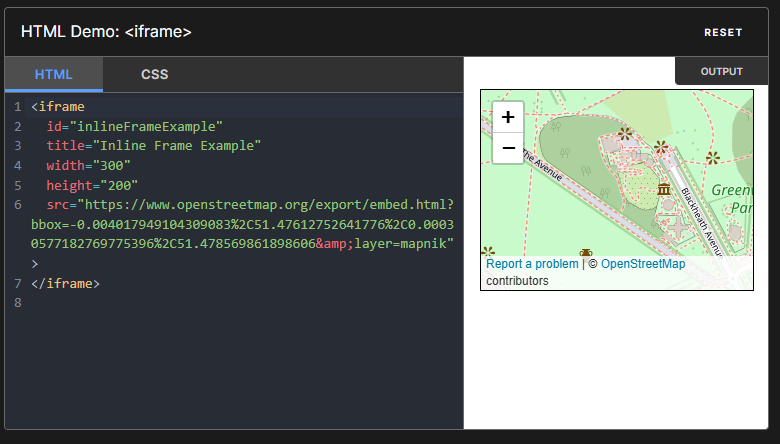
Here’s a basic example of what the code looks like:

HTML

![](https://www.boostability.com/wp-content/uploads/2021/04/Screenshot-2025-05-02-
010059.png)


Your browser does not support iframes.

</iframe>

 * src: Specifies the URL of the page to embed.
 * width & height: Define the dimensions of the frame.
 * title: Crucial for accessibility and SEO – describes the iframe’s content.
 * Fallback content (between the tags): Displays if the browser doesn’t support 
   iframes (less common now, but good practice).
![](https://www.boostability.com/wp-content/uploads/2021/04/Screenshot-2025-04-24-
010025.png)

The <iframe> [HTML](https://developer.mozilla.org/en-US/docs/Web/HTML) element represents
a nested [browsing context](https://developer.mozilla.org/en-US/docs/Glossary/Browsing_context)

### **How Do Search Engines Handle iFrames?**

This is where the old advice needs updating.

 * **Crawling and Indexing:** Yes, Google _can_ crawl and index content within an
   iframe. Googlebot processes iframes similarly to other embedded content. It renders
   the page, including the iframe source, and analyzes the content within the iframe’s
   context. However, there can still be complexities. Indexing isn’t always guaranteed,
   especially if the iframe content is blocked by robots.txt on the source domain
   or if there are technical limitations.
 * **Content Attribution:** This is a key point. Generally, **content within an 
   iframe is primarily associated with the ****_source URL_**** specified in the****
   src**** attribute, not the parent page embedding it.** This means the SEO value(
   keywords, authority) of the embedded content mainly benefits the original source
   page, not the page where the iframe lives. Think of it like embedding a YouTube
   video – YouTube gets the primary SEO credit for the video content itself.
 * **Separate Indexing Context:** Google often considers the iframe content in the
   context of the _source_ page during indexing. While it understands the content
   is _displayed_ on your page, it may not treat it as native content _belonging_
   to your page for ranking purposes in the same way directly embedded text or images
   are treated.

Read about [Crawling and Indexing](https://www.boostability.com/content/what-is-the-difference-between-crawling-and-indexing-in-seo/)
and check what the[ community](https://support.google.com/webmasters/thread/261230208/how-to-do-seo-with-iframes?hl=en)
is talking about

### **The SEO Implications: Pros and Cons of Using iFrames**

While search engines are smarter, using iframes isn’t without potential SEO side
effects.

**Potential Cons:**

 1. **Limited SEO Benefit for Parent Page:** As mentioned, the embedded content primarily
    boosts the source URL’s SEO, not yours. You’re displaying content but not “owning”
    it in Google’s eyes for ranking signals.
 2. **Page Load Speed:** Each iframe loads a separate webpage, adding HTTP requests
    and increasing the overall load time of your parent page. Slow load times negatively
    impact [user experience and SEO](https://www.boostability.com/resources/seo-101/).
 3. **Content Control Issues:** You have limited control over the content displayed
    within the iframe if it’s from a third-party source. If that source changes, breaks,
    or displays undesirable content, it reflects poorly on your page.
 4. **Crawling/Indexing Complexity:** While [Google ](https://www.boostability.com/content/march-2024-core-update/)
    _can_ index iframe content, it adds a layer of complexity. There’s always a slight
    risk it might not be processed or attributed as intended compared to native content.
 5. **Mobile Responsiveness Challenges:** Making iframes truly responsive across all
    devices can be tricky. Content within the frame might get cut off or require awkward
    scrolling on smaller screens, harming the user experience. 
 6. **Security Risks:** Embedding content from untrusted sources via iframe can open
    up security vulnerabilities (like clickjacking) if not handled carefully (using
    attributes like sandbox).
 7. **Potential for Thin Content:** If a significant portion of your page’s main content
    is loaded via iframes, the parent page itself might appear as “thin content” to
    search engines, lacking unique, substantial text directly in its own HTML.

**Potential Pros (Use Cases):**

 1. **Embedding Third-Party Content:** This is the most common and often legitimate
    use. Think:
 2.  * YouTube/Vimeo videos
     * Google Maps
     * Social media feeds (Twitter, Facebook)
     * Third-party widgets (calendars, booking forms)
     * Advertisements (often served via iframes)
     * ![](https://www.boostability.com/wp-content/uploads/2021/04/Screenshot-2025-
       04-24-005722-1.png)
     * Sample [Google Maps](https://developers.google.com/maps/documentation/embed/embedding-map)
       Embed API
     *  **2. Displaying Interactive Content:** Embedding calculators, simple apps, 
       or data visualizations hosted elsewhere. **3. Content Syndication (Use with 
       Caution):** Displaying content from another site you own or have permission 
       to use (though canonical tags or API integrations are often better).

### **SEO Best Practices When Using iFrames**

If you determine an iframe is necessary, follow these best practices to minimize
negative SEO impact:

 1. **Use the ****title**** Attribute:** Always include a descriptive title attribute
    within your <iframe> tag. This helps accessibility (screen readers) and gives search
    engines context about the embedded content.
 2.  * _Bad:_ <iframe src=”…”></iframe>
     * _Good:_ <iframe src=”…” title=”Interactive Location Map for Our Store”></iframe
       >

  **Prioritize High-Quality Sources:** Only embed content from reputable, reliable,
  and relevant sources. Ensure the _source_ page itself is indexable and provides
  value.
  **Consider ****loading=”lazy”****:** Use the loading=”lazy“ attribute to defer
  the loading of off-screen iframes until the user scrolls near them. This can significantly
  improve initial page load times.
   * <iframe src=”…” title=”…” loading=”lazy”></iframe>
  **Test Responsiveness:** Ensure your iframe displays correctly on various screen
  sizes (desktop, tablet, mobile). You might need CSS adjustments to control its
  dimensions effectively.
  **Monitor Performance:** Use tools like Google PageSpeed Insights to check the
  impact of your iframes on page load speed and Core Web Vitals.
  **Security First:** If embedding potentially untrusted content, investigate using
  the sandbox attribute to restrict the iframe’s capabilities and enhance security.
  **Provide Context on Parent Page:** Don’t rely solely on the iframe. Add unique,
  descriptive text on the parent page surrounding the iframe to provide context 
  for both users and search engines.
  
  ### **Modern Alternatives to iFrames**
  
  Before defaulting to an iframe, consider if a more modern solution fits your needs
  better:
   1. **JavaScript Embeds/SDKs:** Many services (like YouTube, Twitter, Facebook) provide
      official JavaScript-based embed codes. These are often more flexible, performant,
      and SEO-friendly than basic iframes.
   2. **APIs (Application Programming Interfaces):** For displaying data or functionality
      from another service, using their API is often the best approach. You fetch the
      data directly and display it natively within your page’s HTML, giving you full
      control over styling and SEO.
   3. **Server-Side Includes (SSI) or Templating:** If you need to embed content from
      _your own server_ (like a reusable header/footer), server-side technologies (
      PHP includes, Node.js partials, etc.) are far more efficient and SEO-friendly
      than iframing your own content.
   4. **oEmbed:** An open format that allows a website to display embedded content (
      like photos or videos) when a user posts a link to that resource, without having
      to parse the resource directly. Many CMS platforms handle this automatically.
   5. **Direct HTML/CSS/JS:** Sometimes, the functionality you want to iframe (like
      a simple calculator or widget) can be built directly into your own page using
      standard web technologies.
  
  ### **Use iFrames Wisely**
  
  So, do iframes hurt SEO? The answer isn’t a simple yes, or no.
  Search engines like Google _can_ process and understand iframe content much better
  than they used to. However, the **primary SEO benefit of the content within the
  iframe typically goes to the source URL, not the page embedding it.**
  Furthermore, iframes can negatively impact page speed, pose responsiveness challenges,
  and potentially introduce security risks if not implemented carefully.
  
  ### **Key Takeaways:**
  
   * **Use iframes primarily for embedding necessary third-party content** (videos,
     maps, widgets) where alternatives aren’t feasible.
   * **Prioritize native content or API integrations** whenever possible for better
     SEO control and performance.
   * If using iframes, **follow best practices:** use title attributes, consider
     lazy loading, ensure responsiveness, and monitor performance.
   * Understand that the **content in the iframe adds little direct SEO value** 
     to the _parent_ page itself.
  By understanding these nuances, you can make[ informed decisions](https://www.boostability.com/content/white-label-seo-audit-tool/)
  about using iframes and ensure they don’t inadvertently harm your website’s performance
  or search visibility.
  Have questions about iframes or other [technical SEO](https://www.boostability.com/resources/seo-tools/)
  challenges? Leave a comment below or get in touch with our SEO experts for a free
  consultation! Get [FREE WEBSITE ANALYSIS](https://www.boostability.com/free-seo-analysis/)
  today.
  >   Original content created last April 7, 2021, updated last May 1, 2025
